AI 3D model generator
Every AI 3D model generator produces a mesh. Few produce a usable one
The gap between a generated model that looks right in a turntable and one that survives a rig, a bake and an engine import is entirely in details the turntable hides. This is what to check, in the order it will bite you.
Mixar is a 3D editor built on Blender that orchestrates the generators rather than being one, so the mesh lands in your scene and the finishing pass below happens in the same window. That is the bias this page is written from, and it is why the checklist is about the output rather than the prompt.
The checklist
Six things to inspect before you trust the output
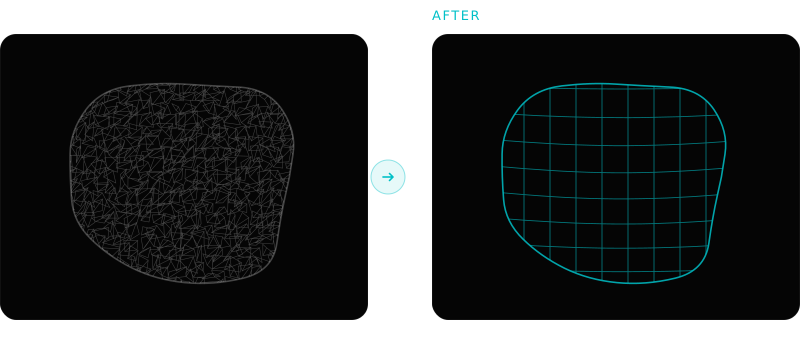
Topology. Open the wireframe, not the turntable. Most generators return dense, unstructured triangles: fine for a static prop at ten metres, unusable for anything that deforms or needs an LOD chain, because unstructured triangles decimate into a mess rather than a lower level of detail. Ask what the face count range is and whether quads are available. The ranges are wide (Tripo's decimation runs 500 to 300,000, Hunyuan's generation up to 1,500,000) and the shipping reality for most props is 500 to 20,000, so assume retopology is part of the job rather than an exception.
UVs. Generated UVs usually exist and usually are not usable for painting: many small islands, arbitrary seams, inconsistent texel density. They are adequate for the texture the generator shipped with them and poor for anything you want to paint across afterwards.
Texture correctness. A single baked colour map is not a PBR set. Look for separate base colour, roughness, metallic and normal, and check the base colour has no lighting or ambient occlusion baked into it. Lighting in the base colour is the most common defect and the most expensive to notice late.
Scale and orientation. Generated meshes arrive at arbitrary scale, arbitrary up-axis and an origin wherever the model put it. Blender works in metres with +Z up, Unreal in centimetres with +Z up, Unity in metres with +Y up, and the glTF 2.0 specification fixes metres and +Y up, so the classic hundred-times-too-small import is the unit mismatch and the ninety-degrees-wrong import is the axis mismatch. A two-minute fix once, and a real cost across forty assets, which is why it is worth checking whether your tool sets it or you do.
Watertightness and thin features. Thin geometry, fine protrusions and hard interior detail are where current models degrade first. Look at fingers, straps, railings and anything with a sharp interior corner before judging the result from the silhouette.
What happens next. This is the one most comparisons skip. The mesh landing on disk is not the finish line, and the tool that hands you a download is handing you the start of the cleanup pass.
The category
The generators are converging. The finishing is not
Practically every current image-to-3D model produces a comparable result on a clean, well-lit, unambiguous reference: matching silhouette, plausible texture, dense triangles. Their differences show up at the edges, on stylised input, on multi-view input, and on thin geometry.
That convergence is why picking on generation quality alone is a weak basis for a decision. The variable that actually changes your week is what the surrounding workflow does with the result: whether it imports into your scene at the right scale, whether retopology and UV rebuild are one briefed step or four applications, and whether the textures come back as a layer stack you can art-direct or a flat map you have to accept.
Mixar's position is deliberate: it orchestrates generation from inside a Blender-based editor rather than being a generator itself, so the output lands in the scene and the cleanup pass is available in the same application. Which engines are wired behind each capability is configured server-side and changes over time, which is a reason to have them behind one interface rather than seven browser tabs.
The pass
What a generated mesh needs before it ships
Inspect and clean: applied transform, no doubles, no loose geometry, correct normals, sane origin and scale for your project.
Retopologise to a budget appropriate to where the asset sits on screen, in quads if anything downstream cares.
Rebuild UVs, because the remesh discarded the old ones, and pack with a margin that suits your bake and mip settings.
Bake the high-poly detail down to the new mesh, along with the mesh maps the texture stack needs: ambient occlusion, curvature, cavity.
Texture, using the generated maps as a base layer rather than the final answer, with masks driven by the baked maps so wear follows the geometry.
Name to the project convention, set pivots, and export with the right axis and scale for the destination engine.
Six steps, all mechanical, all judgement-light once the target is stated. That is the shape of work worth briefing to an agent, and it is why the generator is only half the tool you need.
What the demo shows against what you have to check
| What a demo shows | What decides whether it ships |
|---|---|
| A turntable render | The wireframe under it |
| A textured result | Whether base colour has lighting baked in |
| Time to first mesh | Time to a rigged, baked, exported asset |
| Silhouette accuracy | Thin features and interior corners |
| A download link | Whether it lands in your scene at the right scale |
| One hero asset | The fortieth asset, done the same way |
The honest version
Where generated models are still the wrong tool
Hero characters
Anything that deforms needs edge loops placed for the deformation. Generated topology does not have them, and retopology aligned to curvature does not add them. A generated base can still be a useful starting sculpt.
Assets that must match a library
A generator produces something plausible, not something consistent with the forty assets you already made. Matching an established style and material set is direction, and direction has to be supplied and enforced.
Precise hard-surface parts
Anything where a dimension is a requirement rather than an impression is faster to model. Generated meshes approximate; a bracket that has to bolt to something does not want approximating.
The steps after generation
Frequently asked questions
What is the best AI 3D model generator?
On a clean, well-lit reference the current generation of image-to-3D models produce broadly comparable results, so the honest answer is that the generator is rarely the deciding factor. What differs meaningfully is the workflow around it: whether the result lands in your scene at the right scale, whether the cleanup pass is available in the same application, and whether the textures arrive as something you can art-direct. Judge the finishing, not the turntable.
Are AI-generated 3D models good enough for games?
As a starting point, frequently. As a shipped asset, not without a cleanup pass. Generated meshes are dense and unstructured, the UVs are machine-generated, and the scale and orientation need setting. For background props and set dressing the pass is quick and the economics are strong. For hero assets and anything that deforms, expect real manual work on top.
Can an AI 3D model generator produce clean topology?
Some expose a quad option and a face-count target, which helps, but a face target is not the same as edge flow. Quads following surface curvature are fine for props and static geometry and are not what a rigger needs around a shoulder or a jaw. Plan on a retopology step for anything with deformation requirements, and treat a clean-looking quad mesh as a better starting point rather than a finished one.
Do generated models come with usable UVs and textures?
They come with UVs and textures. Usable depends on what you plan to do. The UVs are typically many small islands with arbitrary seams and inconsistent texel density, which serves the texture that shipped with them and frustrates anything painted across afterwards. Textures are often a single colour map rather than a full PBR set, and any lighting baked into the base colour will fight every light in your scene.
Generate and finish in one application
Mixar orchestrates image-to-3D from inside a Blender-based editor, so the result imports into your scene and the retopology, UV and bake passes are right there. Windows, macOS and Linux.