Image to 3D
One image cannot see the back. That is most of the story
Image to 3D turns a reference into a mesh with texture in minutes, and almost every disappointment with it traces back to the same cause: the model was asked to invent surfaces the reference never showed. Fix the input and the output changes more than switching models does.
The product specifics below are Mixar's. Mixar is a 3D editor built on Blender with the conversion engines and the cleanup pass in one application, so the mesh arrives in your scene instead of a downloads folder.
The mechanism
What the model is actually doing
Given one image, a model infers a full three-dimensional form from a single projection of it. The visible surfaces are reconstruction. Everything else, the back, the underside, the far side of every occluded detail, is a plausible guess drawn from what similar objects look like.
That is why results are excellent on objects whose form is implied by their front (a mug, a chair, a symmetrical prop) and unreliable on objects whose back genuinely differs from their front (a character with a bag, a machine with a serviceable rear panel, anything asymmetric).
It also explains the most common failure: a beautiful front, a smeared back, and texture on the hidden surfaces that looks like it was invented, because it was.
The fix
Multiple views change the problem, not just the quality
Supplying several angles of the same subject moves the far side from invention to reconstruction. It is a different job for the model, not a better-quality version of the same one, and the difference in output is correspondingly larger than any parameter tweak.
In Mixar the setup is one frontal image plus up to seven additional angles, eight images maximum: left, right, back, top, bottom, left front and right front. The frontal image is the primary input and the others are companions bound to it. The four extended angles are accepted only by the newer engine version, and Mixar filters the list to match rather than letting the job fail server-side after your credits are already committed.
There is a specific trap this replaces. Uploading a single character turnaround sheet showing four poses in one image gives the model one picture containing four subjects, and it will model all four panels as one object. The sheet has to be split into per-view images first, which Mixar does with a detect-views step that cuts the sheet into labelled panels and assigns each one an angle.
If the subject exists physically, three photographs at front, side and back beat any amount of prompt engineering on one.
The controls
What the settings do to the result
Face count. Mixar's Pro path runs from 40,000 to 1,500,000 faces. Higher is not better in any sense that survives to the engine: it is denser triangles, not more information, and everything above what you actually ship is a retopology step you made larger. For scale, an asset covering 5 per cent of a 1080p frame has about 100,000 pixels to work with, so a million-face mesh is spending most of its geometry on triangles smaller than a pixel. Pick for what the asset is, then retopologise to the real budget.
PBR textures. On, the result comes back with a material set rather than a single colour map, which is the difference between something you can light and something that fights your lighting. Off is faster and appropriate when you only want the form because you intend to texture it yourself.
Generate type. A normal pass returns the textured result. A geometry pass returns an untextured white model, which is the right choice when the mesh is a blockout you will replace the surface of anyway.
Model choice. Which engines are available is configured server-side and changes, and their behaviour differs mostly on stylised and thin-featured input rather than on clean product-style references.
After the import
The result lands in the scene, not a download folder
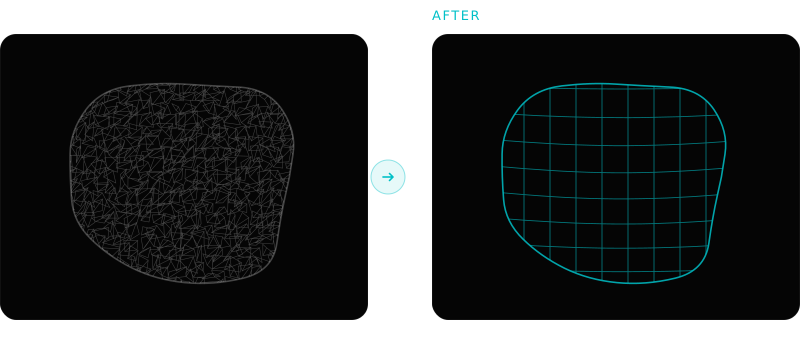
This is the part that decides whether image to 3D saves time or just relocates it. A generated mesh is a detailed blockout: dense triangles, machine-generated UVs, arbitrary scale and orientation. Getting from there to a shippable asset is the same fixed sequence every time.
Clean the mesh, retopologise to a budget, rebuild the UVs the remesh discarded, bake the high-poly detail down, texture over the generated maps rather than accepting them, then name, set pivots and export. The mesh itself usually arrives as glTF 2.0, which at least removes the unit and axis guesswork: the format fixes metres and Y-up.
Running that in the same application the mesh arrived in is the entire argument for generating inside an editor. It is also work an agent can run as one briefed pass rather than seven manual decisions, which is what the guides below cover.
What one image gets you against what several do
| Single reference | Frontal plus angles | |
|---|---|---|
| Front surfaces | Reconstructed | Reconstructed |
| Back and far side | Invented plausibly | Reconstructed |
| Asymmetric detail | Usually lost | Usually kept |
| Texture on hidden faces | Guessed | Derived from your images |
| Best for | Symmetric props, product shots | Characters, machines, anything asymmetric |
| Effort to prepare | One image | Three to eight images of one subject |
The honest version
Where image to 3D does not help
Anything dimensioned
If a measurement is a requirement rather than an impression, model it. Image to 3D approximates form from appearance, and a bracket that has to bolt to something does not want approximating.
Thin and fine geometry
Fingers, straps, railings, wires and sharp interior corners are where current models degrade first. Check those before judging a result from its silhouette, because the silhouette is what these models are best at.
Assets that deform
The mesh has no edge loops placed for deformation and retopology aligned to curvature will not add them. A generated character is a starting sculpt, not a riggable asset.
Before and after the conversion
Frequently asked questions
How does image to 3D work?
The model infers a complete three-dimensional form from a two-dimensional projection of it. Surfaces visible in your reference are reconstructed from what it can see; everything hidden, including the entire back, is inferred from what similar objects tend to look like. That split explains most results: strong where the form is implied by the front, unreliable where the back genuinely differs.
How many images do I need for image to 3D?
One works and several are substantially better for anything asymmetric. Mixar takes one frontal image plus up to seven additional angles, eight images maximum, covering left, right, back, top, bottom and the two front three-quarter views. Additional views convert the hidden surfaces from invention into reconstruction, which changes the result far more than adjusting parameters does.
Can I use a character turnaround sheet as the input?
Not as a single image. A sheet showing four poses is one picture containing four subjects, and the model will treat all four panels as one object and fuse them. The sheet has to be split into separate per-view images with an angle assigned to each. Mixar has a detect-views step that cuts a sheet into labelled panels and submits them as one multi-view job.
What face count should I ask for?
Whatever suits the asset, then retopologise to the real budget afterwards. A higher face count is denser triangles rather than more information, and everything above what you intend to ship simply makes the retopology step bigger. The useful question is where the asset sits on screen, not what the maximum is.
Convert, then finish, without changing applications
Mixar runs image to 3D from inside a Blender-based editor, so the mesh imports into your scene and the cleanup pass is in the same window. Windows, macOS and Linux.