AI 3D
AI in 3D, stage by stage, with the honest version of each
AI 3D covers a dozen different techniques with wildly different track records. Some of them are production-ready and boring. Some are demos. Knowing which is which is most of the value, so this page goes through the pipeline one stage at a time.
Written from inside the problem: Mixar is a 3D editor built on Blender that runs most of the stages below in one application, with the Blender toolset and .blend files unchanged. Where a stage is not solved, this page says so rather than selling around it.
The framing
The pipeline is not one problem
Most writing about AI and 3D treats the field as a single question: can a model make a usable asset from a prompt. That is one stage out of eight, it is the stage artists least want automated, and it is the stage where the honest answer is still qualified.
The rest of the pipeline is where the hours actually go. Blocking out, retopologising, unwrapping, baking, texturing, naming, setting pivots and exporting. Every one of those has a different relationship with automation, and lumping them together is why the conversation stays stuck between hype and dismissal.
What follows is the stage list, in the order the work happens, with what current tooling does well and where it hands the problem back.
Stage one
Concepting and reference
Image generation is the most mature part of AI in 3D and the least controversial, because a reference image is not the deliverable. Concept sheets, material references, lighting studies and mood boards are all things artists already assemble from other people's images, so generating them is a straight improvement to a step nobody was precious about.
The technique that earns its keep here is depth-guided generation. You block out the composition in the viewport with primitives, capture the depth, and render an image that respects your geometry and camera rather than inventing its own. That inverts the usual complaint about generated images, which is that they are beautiful and structurally useless, because the structure came from you.
Stage two
Getting geometry
Image to 3D is genuinely useful and consistently oversold in the same breath. Current models will give you a mesh whose silhouette matches your reference, with texture, in minutes. What they will not give you is topology you would ship: expect dense triangles, seams in arbitrary places, and UVs that exist rather than UVs that are usable. The face-count sliders tell the story on their own, running as high as 1,500,000 while most props ship between 500 and 20,000. Everything above your budget is retopology work the generator created for you.
That is a real result as long as it is understood as a blockout with detail rather than a finished asset. The mistake is treating the mesh as the end of the job. It is the start of the cleanup pass, and the cleanup pass is the thing worth automating.
Whole-scene generation goes further: segment a reference image into objects, convert each one separately, and place them preserving the spatial relationships from the source. It gets you a populated scene to iterate on rather than one mesh, which is a different and often more useful thing.
Stage three
The cleanup nobody films
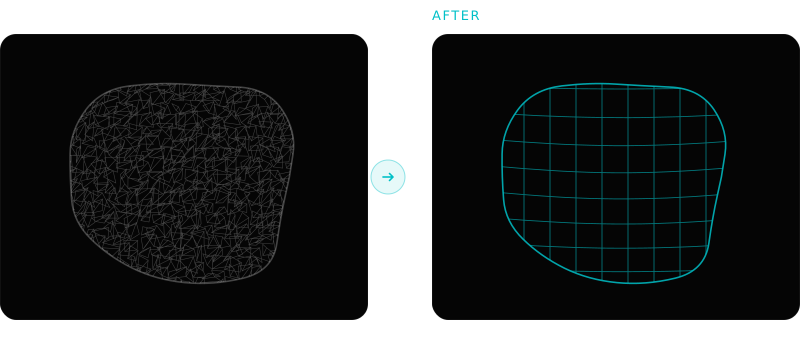
Retopology, UV unwrapping and baking are the stages where AI marketing goes quiet, and they are exactly the stages that consume the schedule. They are also the ones with the longest history of successful automation: field-aligned quad remeshers have existed for years and Blender ships QuadriFlow and voxel remeshing for free, its unwrap solvers are competent, and Cycles bakes mesh maps reliably.
The gap has never been the algorithm. It is the decision-making around it: is this mesh clean enough to remesh, what density does this asset need given where it sits on screen, do the UVs need to be rebuilt or transferred, which mesh maps does the texture stack actually need. Each is a small judgement followed by a mechanical action, repeated across every asset.
That pattern is what an agent is for, and it is why the interesting work in AI 3D right now is not a better generator.
Stage four
Texturing and materials
Generating a PBR set from a description or a photograph is well established and works. Base colour, roughness, metallic and normal, projected through the mesh's UVs and wired into a material. Where it needs care is correctness rather than plausibility: base colour with no lighting baked into it, roughness varying across the 0.2 to 0.8 range most real surfaces occupy, metallic that is effectively binary rather than a mid-grey dial, and a normal map whose green channel matches the destination (+Y for Blender and OpenGL, -Y for Unreal and DirectX). Get that last one wrong and the lighting looks subtly inverted in a way that takes an hour to place.
The bigger shift is treating generated maps as layer one rather than the answer. Once the generated set is the base of a layer stack, the wear, edge damage and dirt go on top, driven by masks baked from the geometry itself, and the result is art-directable instead of take-it-or-leave-it.
Where each stage actually stands
A rough read on maturity, from the perspective of someone who has to ship the asset rather than post the render.
| Stage | State today | What still needs a person |
|---|---|---|
| Reference and concept | Production-ready | Art direction, and choosing what to keep |
| Depth-guided render | Production-ready | The blockout itself, which is the point |
| Image to 3D | Useful, needs cleanup | Topology, UVs, scale, and the finishing pass |
| Scene assembly from an image | Useful, needs cleanup | Layout intent, and per-object quality |
| Retopology | Mature for props, weak for characters | Deformation loops on anything that rigs |
| UV unwrapping | Flattening solved, seams not | Seam placement on hero assets |
| Baking | Mature and deterministic | Cage and ray-distance decisions |
| PBR generation | Production-ready as a base layer | Art direction and project conventions |
| Rigging | Skeleton and weights, yes | The control rig: IK, constraints, corrective shapes |
| Animation and retargeting | Early | Almost everything |
The honest version
Three things AI 3D is not doing yet
Shipping a hero asset unattended
Everything above is a stage, not a pipeline. Chaining them without a person checking between steps compounds small errors into an asset that looks approximately right and fails in the engine.
Understanding what the asset is for
No current tool knows this crate is set dressing at ten metres and that one is a hero prop the camera pushes into. That single fact should drive density, texture budget and how much time anything gets, and it has to be supplied.
Replacing topology judgement
Curvature-aligned quads are not the same as edge loops placed for deformation. On anything that bends, a rigger still needs to look at the wireframe, and that is unlikely to change soon.
Go deeper on a stage
Frequently asked questions
What is AI 3D?
AI 3D is a loose umbrella for machine-learning techniques applied to 3D content: generating reference images, converting images into meshes, assembling scenes from a photograph, generating PBR materials, automatic retopology, automatic UV unwrapping, and agents that operate a 3D application directly. They are separate techniques with very different maturity, so the useful question is always which stage of the pipeline is being discussed.
Can AI create 3D models that are ready to use?
Ready to look at, usually. Ready to ship, rarely. Current image-to-3D models produce a mesh with a matching silhouette and a texture, but the topology is dense and unstructured, the UVs are machine-generated, and the scale and orientation need setting. Treated as a detailed blockout that still needs a cleanup pass, the output is genuinely useful. Treated as a finished asset, it will fail somewhere between the rig and the engine.
Which parts of a 3D pipeline benefit most from AI?
The mechanical middle: retopology, UV rebuilds, mesh map baking, scene cleanup, naming conventions and export prep. These are high volume, judgement-light and repetitive, and they consume far more schedule than anyone plans for. They are also the parts nobody demos, which is why the perception of AI in 3D is skewed toward generation.
Is AI going to replace 3D artists?
Nothing in current tooling makes that plausible. Every stage above hands a decision back at some point, and the decisions that get handed back are the ones that require knowing what the asset is for, how it will be seen and what the project's conventions are. What is genuinely changing is the ratio: less time on mechanical finishing work, more on the parts that need judgement.
See it on a scene you already have
Mixar is a Blender-based editor with the agent and the generation tools in one application, on Windows, macOS and Linux. Open an existing file and brief it on the stage you were about to do by hand.