Automation guide
Auto retopology in Blender, done in one step
Retopologise a high-poly mesh without leaving Blender: select it, brief the agent, get quads back with UVs rebuilt. And when to still do it by hand.
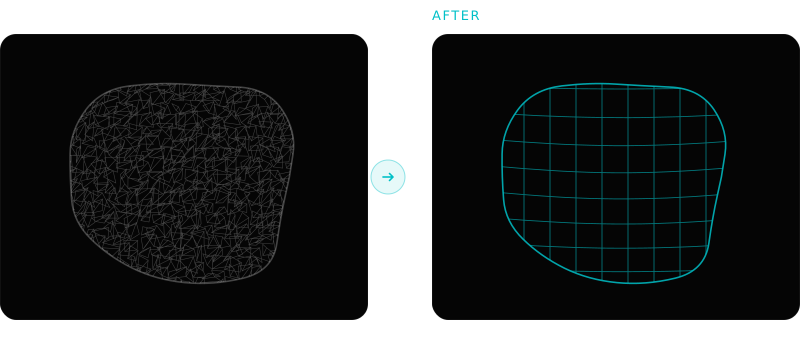
Retopology is the step everyone skips until it blocks them. Mixar removes it as a separate task: select the high-poly mesh, tell the agent what density you need, and a clean mesh comes back in seconds with the UVs rebuilt, without leaving the editor or exporting anything.
If you have not come across it: Mixar is a 3D editor built on Blender. The full Blender toolset, shortcuts and file format are there and unchanged; what is added is an AI agent, called Mixie, running inside the application rather than bridged to it from outside. It runs on Windows, macOS and Linux.
That is the whole pitch, and the rest of this page is the detail behind it: what runs when you press it, what the controls do, how to pick a target density, and the cases where you should still retopologise by hand.
What actually runs#
Retopology in Mixar is a hosted engine call, not a local solver churning on your CPU. The mesh is sent, processed and imported back as a queued job, so the editor stays responsive and you keep working while it runs.
Select the high-poly
Any mesh in the scene. A sculpt, a photogrammetry scan, an image-to-3D result. No preparation required.
Say what you want
Either use the Retopology panel, or brief the agent in plain language: the target density, quads or triangles, whether to rebuild UVs afterwards.
The job runs
The engine returns a retopologised mesh. It is a queued job, so nothing blocks and you can queue more.
It lands in your scene
The result imports next to the original, named so you can tell them apart, with UVs rebuilt when you asked for them.
Two engines sit behind the one Retopology service, and which one you get is a dropdown rather than a different product:
- Tripo
- Quad toggle plus an explicit face limit, 500 to 300,000
- Hunyuan
- Triangle or quad, a high, medium or low face level, optional post-process pass
- Output
- Imported into the scene, not downloaded to a folder
- Agent access
- Callable as one step inside a longer briefed pass
The practical difference: Tripo takes an explicit face limit, which is what you want when a polygon budget is a hard number handed to you by a technical director. Hunyuan takes a coarse face level, which is what you want when the target is "clean enough to work with" rather than a specific figure.
Why doing it in the editor matters more than the remesh#
Every remesher on the market produces a comparable quad mesh on a clean input. What differs is everything around the operation, and that is where the hours actually go.
Retopology as a separate tool
Export the high-poly. Open the other application, or find the add-on panel. Set parameters. Wait. Import the result. Discover the transform was not applied. Fix it. Re-export. Re-import. Rebuild the UVs the remesh destroyed. Set up a bake. Repeat for asset two of forty.
Retopology in Mixar
Select the mesh. State the target. The result arrives in the scene with UVs rebuilt. If it was one step in a longer brief, the cleanup before it and the bake after it already happened too.
That last sentence is the part worth dwelling on. Retopology is almost never the whole job. The real sequence is: inspect the mesh, clean what would make the remesh fail, retopologise to a budget, rebuild the UVs, bake the high-poly detail down, name it, export it. Seven steps, six of them mechanical.
Picking a target density#
This is the one decision automation cannot make for you, because it depends on facts only you have.
The question is not "what is a good polycount", it is "how much screen does this asset occupy, and how many of it exist". A crate seen at ten metres and a hero prop the camera pushes into are the same object with two completely different correct answers.
- Background and set dressing. Go lower than feels comfortable. The silhouette carries almost all of the read at distance, and you will have thirty of them in frame.
- Mid-ground props. Enough density to hold the silhouette under a moving camera, no more. Detail belongs in the normal map.
- Hero assets. Higher, and check the wireframe rather than trusting a number.
- Anything that deforms. See the limit below. A face count is not the constraint that matters here.
State the number in the brief and the agent uses it. Change your mind and rerun it; the original mesh is still in the scene.
The manual methods, and when they are still right#
Worth knowing, because you will meet all of them and because Blender ships two of them for free.
| Method | Where | The control that matters | Trade |
|---|---|---|---|
| Mixar Retopology | Selected mesh, or a brief to the agent | Face target, quads or triangles | Hosted job, so it needs a connection |
| QuadriFlow | Object > Quadriflow Remesh | Face Count, plus Preserve Sharp and Preserve Mesh Boundary | No guide edges; fails on non-manifold input |
| Voxel Remesh | Object Data > Remesh, Voxel mode | Voxel Size, in scene units | Uniform density everywhere; destroys UVs |
| Decimate | Decimate modifier, Collapse mode | Ratio | Keeps the original triangle structure, so the result stays messy |
| Manual retopology | Poly Build, snapping to surface | Your own judgement | Hours per asset |
Two settings people miss. Blender documents both free methods in the Remesh modifier reference, and they are worth reading once because the defaults are not the useful ones. QuadriFlow's Preserve Sharp and Preserve Mesh Boundary are off by default and are usually what you want on hard-surface input, because without them the remesher rounds off the edges that define the object. And Voxel Remesh's Voxel Size is in scene units, so on a mesh whose scale was never applied the number means something entirely different from what you intended: 0.01 on a 100x-scaled object is effectively 1.0.
Manual retopology is not stubbornness on a hero character. When a rigger will inspect the wireframe and tell you the pole placement is wrong, the topology is the specification, and no automatic method competes. The point of automating the rest is that it buys you the time to do that properly.
What makes automatic retopology fail#
Most failures blamed on a remesher are input failures, and they are the same five every time. The agent checks for these before it submits, which is most of the value of running it inside the editor rather than through an export.
- Unapplied non-uniform scale. Ctrl+A, Scale. Non-uniform scale confuses distance-based algorithms.
- Merge by distance.
M > By Distancein Edit Mode. Doubled vertices read as non-manifold. - Loose geometry.
Select > Select All by Trait > Loose Geometry, then delete. - Interior faces from booleans. Solidify and boolean stacks leave faces inside the volume. Nothing outside can see them and everything downstream trips on them.
- Inverted normals.
Shift+Nto recalculate outside. A bake on inverted normals comes back inside out.
The scene cleanup guide covers the full pass, and the agent can run it as one instruction across a whole file rather than per object.
After the retopology#
The new mesh has no UVs from the original and none of its surface detail. Both are recoverable and both are mechanical:
- Rebuild the UVs. AI UV unwrapping covers what automation handles and where seams still need marking.
- Bake the high-poly down. Normal, ambient occlusion, curvature and cavity, from the original onto the retopologised mesh. Automating baking in Blender covers cage and ray distance.
- Texture over it. PBR map generation applies a full material set through the new UVs.
- Rig it, if it moves. Auto rig in Blender fits a skeleton and skin weights to the retopologised mesh. Rig after the retopology, never before: binding weights to geometry you are about to replace throws the work away with the mesh.
Briefed together, that is one instruction rather than three sessions. Each of those passes is covered in the AI agent for Blender pillar, which is the map of what the agent handles across the whole pipeline rather than at this one step.
Frequently asked questions
Can AI do retopology in Blender?
Yes, and in Mixar it is a single step on a selected mesh. Choose a target density, pick quads or triangles, and the retopologised mesh imports back into the scene with UVs rebuilt. Two engines sit behind it, Hunyuan topology and Tripo, selected from a dropdown. What automation does not do is place edge loops for deformation, so hero characters heading into a rig still want an artist over the result.
What is the best auto retopology tool for Blender?
For props, scans, generated meshes and anything you are processing in volume, the useful measure is not the remesh quality but how much of the surrounding work the tool removes. Mixar runs the retopology on the selected mesh and rebuilds the UVs in the same step, and the agent can fold it into a longer pass that also cleans the mesh and bakes the detail down. Blender's built-in QuadriFlow is a capable free alternative for a one-off asset, and Quad Remesher is the well-regarded paid add-on if guide edges are what you need.
Does automatic retopology give clean edge flow for animation?
Not reliably, and this is the honest limit on every automatic method rather than a gap in one product. Automatic approaches align quads to surface curvature, and curvature does not indicate where a joint will bend. Expect an acceptable result on props and static geometry, and expect to place loops yourself around the face, shoulders, elbows and knees on anything that deforms.
Do I need to export my mesh to retopologise it?
No. That is the main practical difference from running a separate tool: the mesh never leaves the editor. Retopology runs on the selected object and the result imports back into the same scene, so there is no export, no file round trip and no rescaling on the way back in. It runs as a queued job, so the editor stays responsive while it works.
How many polygons should I target?
Base it on how much screen the asset occupies and how many instances exist, not on a number you read somewhere. Background props can go far lower than feels comfortable because the silhouette carries the read at distance. Hero assets deserve more, and want the wireframe checked rather than the number trusted. State the target in the brief and rerun it if you were wrong; the original mesh is still in the scene.