Workflow guide
Blockout to video: grey boxes as a direction system
Untextured blockout geometry plus a camera move is the strongest input an AI video model takes. How to build one in Blender and hand it over.
The best thing you can hand an AI video model is not a beautiful frame. It is an unambiguous one.
Boxes in the right places, seen from a camera that moves the way you want, answer every structural question the model would otherwise answer for you. Mixar is a 3D editor built on Blender where the blockout, the camera move and the generation all live in the same file.
Film has called this previz for decades: rough blocking that settles camera language before anything expensive is committed. The logic transfers exactly.
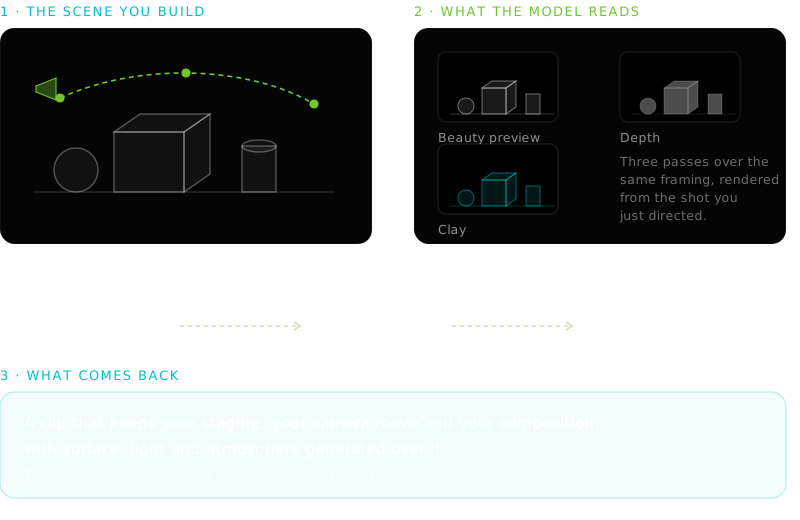
The whole argument, in one frame
Build one in twenty minutes#
If it is taking longer, it is turning into an asset.
Primitives only
Cubes, cylinders, planes. A character is a capsule with a head. Silhouette is the only thing that has to be right.
Get the scale honest
The one place accuracy pays. A doorway at the wrong height reads as wrong in the clip in a way nobody can name.
Block the ground and the horizon
Objects floating in a void generate as objects floating in a void.
Place the camera early
The framing decides which geometry matters. Half of what you were about to build is off camera.
Leave the materials alone
Grey is the point. The clay pass exists to strip whatever you add.
Lighting is optional too. The clip supplies its own, so beyond enough to read the viewport there is nothing to gain from setting up world lighting at this stage.
What the blockout is actually carrying#
- Staging
- What is where, and what is in front of what. Occlusion is near impossible to describe and trivial to show.
- Scale
- Sizes relative to each other and to the camera. Models get this wrong unprompted.
- Camera path
- Where the lens starts, ends and travels, communicated as stills from along it.
- Depth
- Distance as a value rather than a description, with no opinion about material.
Notice what is missing: colour, material, lighting, atmosphere, weather, mood. All of that is what the model is for. A blockout that starts acquiring materials is drifting into being a render, which is a far more expensive way to say the same four things.
Direct the camera through it#
A blockout with a static camera is a photograph. The move makes it a shot, and it is authored as a handful of poses rather than a curve.
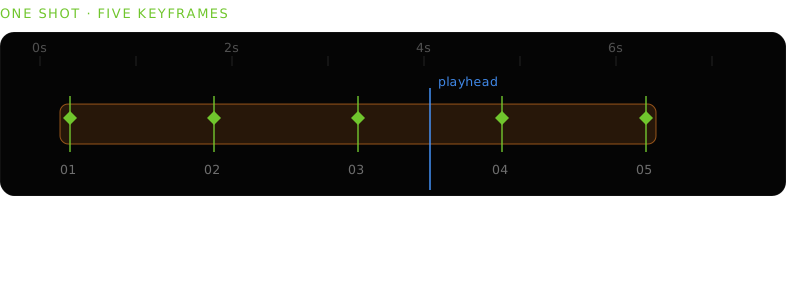
Fly the camera with WASD or place it numerically, then capture. Presets write the same keyframes for the standard moves: orbit, dolly, crane and pan, each pivoting on the depth of whatever is in front of the lens.
Hand animation
Set keys, fix interpolation, scrub, adjust, then render a frame set separately and track which file is which moment.
Sparse capture
Pose, press F, repeat. The strip interpolates, stills pack as you go, and one action renders the guides across the range.
Handing it over#
Three passes go across the shot:
- Beauty preview
- The shot as the viewport sees it.
- Clay
- Materials suppressed, so form and lighting read without colour interference. The most useful single pass.
- Depth
- Normalised distance from the lens.
Continuing to video generation selects the keyframe stills, copies your direction into the prompt and opens the tab without submitting. The last decision stays yours.
Adherence is worth setting deliberately. Conservative holds every keyframe's framing closely, which is right when the blockout is the point. Expressive treats them as anchors for a looser move.
The same loop, running the other way
What it will not do#
When to skip the blockout#
Not every clip needs one. A texture-and-atmosphere shot with no specific staging, an establishing plate, or anything genuinely exploratory is faster to prompt than to build.
The blockout earns its twenty minutes when you already know what has to be in frame and where the camera goes, which is exactly when a prompt frustrates most.
The model's own inputs and controls are in Seedance 2.5 in Blender, the wider loop in AI video generation in Blender, and the same argument for stills in text to 3D. The case for briefing mechanical passes rather than performing them is the AI agent for Blender pillar.
Frequently asked questions
What is a blockout, and why does a video model care?
Rough untextured geometry that establishes layout, scale and camera framing before detail work. The model cares because those are the structural facts it would otherwise invent. Supplying them as renders removes its freedom over the parts you have already decided.
Do I need to light or texture the blockout first?
No, and it usually makes guidance worse. Materials fight the clay pass, and lighting is regenerated anyway. Enough light to read the viewport is plenty.
How many frames should I send from a camera move?
Fewer than you would expect. The cap is nine, but a handful of well-spaced poses communicates a move better than nine near-identical frames. Start, one or two mid-points and end covers most of them.
Can this replace previz?
For look and mood exploration, yes, and it is fast enough to compare several treatments in an afternoon. For anything with a technical downstream, exact lens data or plates that must match a real set, the blockout scene stays the deliverable and the clip is a presentation of it.