Launch coverage
Seedance 2.5 in Blender, driven by the scene you already built
Seedance 2.5 generates up to 30 seconds in one pass. In Mixar, a Blender-based editor, it reads references rendered from your own scene.
Seedance 2.5's API opened today, and it is already wired into Mixar, a 3D editor built on Blender.
The interesting part is not text to video. It is that Seedance reads reference material, and a 3D scene can produce better reference material than anything you could describe.
Drag the divider
Why a scene beats a prompt#
A prompt is a bad way to describe a shot. Where things sit, what blocks what, how big anything is, where the camera starts and ends: none of that survives being written down.
Grey boxes answer all four in about twenty minutes. Nothing is lit, textured or rendered properly, because none of that is what the model reads.
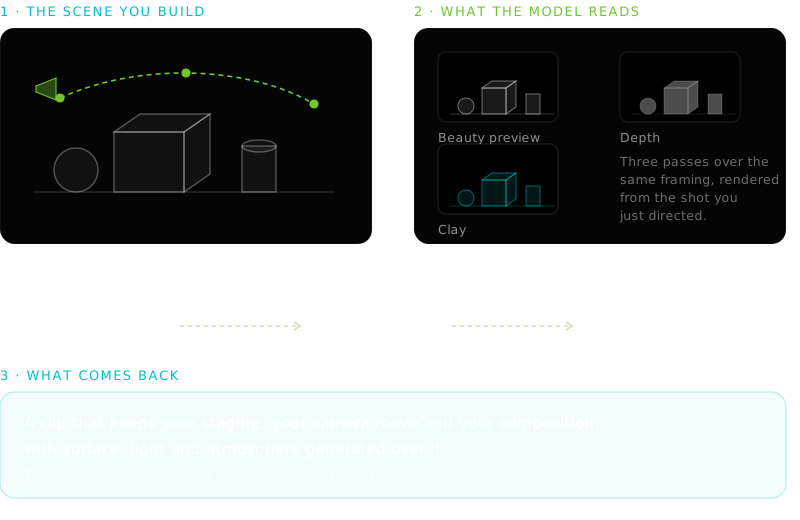
Mixar renders three guide passes across a shot. A beauty preview, a clay pass with materials suppressed so form reads cleanly, and a normalised depth pass. They land on the moodboard grouped under the shot's name.
Depth is the one people underestimate. It has no opinion about colour or material, so it pins layout and distance without arguing with your prompt.
Directing the shot#
Directing happens in the viewport, from a toggle in the topbar.
Frame it
Lens in millimetres from 18 to 135, with named presets. Aspect from a list including 16:9, 2.39:1 and 9:16.
Pose and capture
Fly the camera with WASD, or place it numerically, then press F. Auto Key captures for you when the pose settles.
Or use a preset
Orbit, dolly, crane and pan, each pivoting on the depth of whatever the camera is looking at.
Render the guides
Beauty, clay and depth across the shot, grouped in the moodboard.
Continue to Video Gen
The keyframe stills become the selection and the direction becomes the prompt. Nothing submits until you press generate.
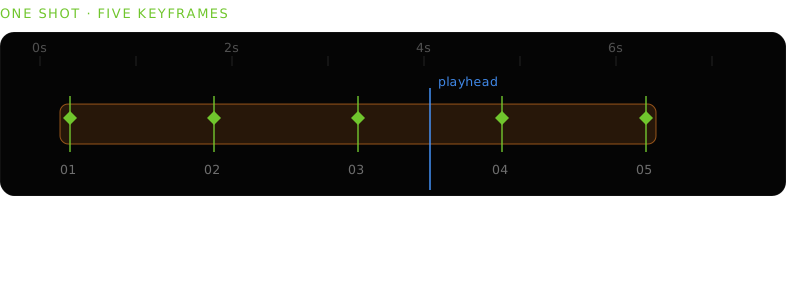
Handheld drift is a per-shot toggle rather than a preset, since jitter cannot be described by five keyframes. Your captured poses stay clean and the previews carry the movement.
What you can send it#
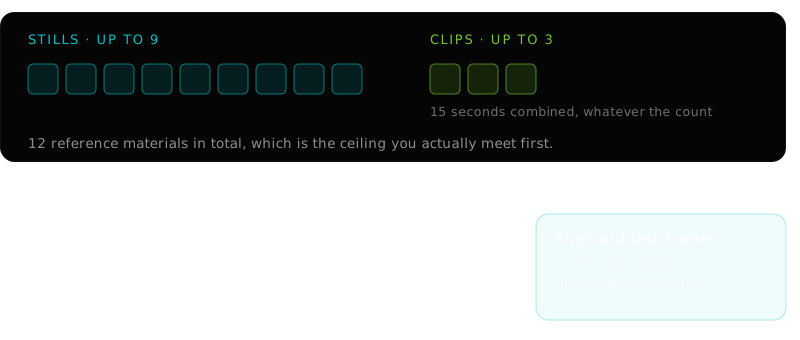
Images are read three ways, and you choose which:
- Reference
- Every still guides the whole clip. The default, and the right one for keyframe renders along a camera move.
- First frame
- One image, pinned as the exact opening frame.
- First and last
- Exactly two images. The model generates the transit between them.
The frame modes enforce their counts rather than trimming your selection, because quietly dropping references and charging for the result is the worst possible behaviour.
The board the references live on
The controls#
- Duration
- 4 to 30 seconds.
- Resolution
- 480p or 720p.
- Aspect ratio
- Auto, 21:9, 16:9, 4:3, 1:1, 3:4, 9:16.
- Audio
- Generated with the picture. On by default.
- Seed
- Fixed to repeat a result, or random.
Generation is a queued job, so the editor stays usable and the queue tells you what is running. The finished movie is added to the moodboard of the scene it came from, plays in place, and becomes a node you can feed into the next generation.
What it will not do#
If you need the actual pixels of your actual asset, render it. If you need a moving image that respects your layout and camera while inventing everything else, this is the shorter route.
Related reading#
Building the geometry that does the directing is covered in blockout to video. The wider loop is in AI video generation in Blender, and what changed since the last model in Seedance 2.5 against 2.0. The same argument one level down, for stills, is text to 3D.
Video is the newest tab in a moodboard that already does image generation, image to 3D and PBR texturing, and the same AI agent for Blender can drive all of them. ByteDance's Seedance launch post covers the model's announced capabilities, which are broader than any single API tier.
Frequently asked questions
What is Seedance 2.5?
ByteDance's video generation model, announced at the end of July 2026 with a public API on 7 August. It generates a thirty second clip in one pass rather than stitching shorter ones, produces audio alongside the picture, and accepts multimodal references. What an API tier exposes is usually narrower than what was announced, so check both.
Can I use Seedance 2.5 with Blender?
Yes, inside Mixar, which is a 3D editor built on Blender rather than an add-on bridged to one. Video generation is a sidebar tab, references come from the in-app moodboard, and the finished clip returns to that board in the file it came from.
What resolution and length does it produce?
4 to 30 seconds at 480p or 720p, in one of seven aspect ratios. Audio is on by default. The 4K in the launch coverage belongs to other surfaces, not this endpoint.
Do I need to model and light a full scene first?
No, and it usually wastes effort. Untextured grey boxes with a camera move through them guide the model better than a finished render, because what it reads is silhouette, depth and framing. Materials and lighting are what it generates.