Model comparison
Seedance 2.5 against 2.0: what changed, and what the API exposes
Seedance 2.5 adds 30 second single-pass clips, more reference inputs and joint audio. What the public API exposes is narrower. Both matter.
Two questions get asked about a new video model, and they have different answers. What was announced is one thing. What you can call today is usually a subset.
Seedance 2.5 is a clear case of that gap. Mixar, a 3D editor built on Blender, wires the model through its published API, so everything below separates the two.
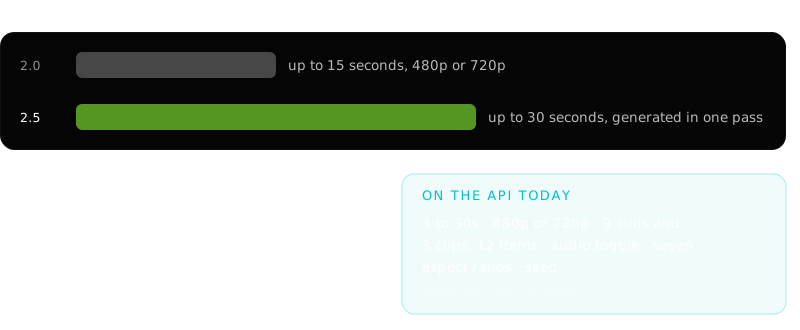
30 seconds, one pass
The 2.0 baseline#
Comparisons here are usually built from launch coverage, which is how contradictory numbers end up circulating. These come from fal's own Seedance 2.0 API repository, the provider's published documentation rather than a summary of it.
- Length
- 4 to 15 seconds, at 480p or 720p.
- Aspect ratios
- 16:9, 9:16, 4:3, 3:4, 1:1 and 21:9.
- References
- Up to 9 images, 3 videos and 3 audio clips, capped at 12 files total.
- Video pricing
- Video references carry a 0.6x rate multiplier, with input duration billed alongside output.
That last row explains something otherwise puzzling about cost: supplying a reference video makes the per-second rate cheaper and adds the input's own seconds to the bill. The same structure carries into 2.5.
Length, and why one pass is the real change#
Length is the most quoted number in this category and the least interesting, because it is easy to fake. Generate several short clips, join them, and you have thirty seconds with a seam every few seconds where continuity quietly resets.
Seedance 2.5 does thirty in one pass. That changes what the number means: continuity of subject, lighting and camera becomes a property of the generation rather than something to repair in an edit.
Stitched
Several generations joined. Each junction can change a face, a material or a light direction without warning, and the repair is manual.
Single pass
One generation across the full duration. Continuity is not assembled afterwards.
Doubling from fifteen matters more than most doubled numbers, because fifteen seconds is roughly where a single shot stops being long enough to carry an idea. Thirty is a sequence.
Reference input, and the 3D angle#
Both generations take multimodal references. The launch material for 2.5 describes a substantially wider ceiling: a larger image budget, more clips, audio references, and 3D blockout geometry as a guidance input.
That last one is what changes the job for anyone working in 3D. Untextured geometry as a spatial guide means composition and camera path stop being things you describe and become things you supply. That workflow is covered in blockout to video.
Audio#
Audio generated in the same pass as the picture is synchronised because it was never separate. In Mixar it is one toggle, on by default, with no separate audio prompt, so anything specific about sound belongs in the main prompt.
What the API exposes#
- Duration
- 4 to 30 seconds.
- Resolution
- 480p or 720p. Not 4K.
- Aspect ratio
- Auto, 21:9, 16:9, 4:3, 1:1, 3:4, 9:16.
- References
- Up to 9 stills and 3 clips, 12 items total, reference video capped at 15 seconds combined.
- Image mode
- Reference, first frame, or first and last frame.
Reference mode is the general case. First frame pins one image as the exact opening frame. First and last takes exactly two and generates the transit between them. The frame modes take no video references and enforce their counts exactly rather than trimming a larger selection.
How to read any launch spec sheet#
Separate the product from the endpoint
A capability in a consumer app is not a capability in the API. Both claims can be honest at once.
Find the ceiling that binds
Nine stills and three clips sound generous until you notice the twelve-item total. The smallest limit shapes the workflow.
Treat quality claims as untested
Prompt adherence and character consistency decide whether output is usable, and no spec sheet can tell you.
What it means for a 3D workflow#
Longer single-pass clips and a wider reference budget point the same way: the model gets easier to direct, not merely better at inventing.
For an application with a 3D scene in it, that turns generation into a downstream step of ordinary work. The camera move exists. The staging exists. Rendering guide frames from them costs nothing.
The details are in Seedance 2.5 in Blender and the wider loop in AI video generation in Blender. The same discipline applies as everywhere else in this stack, and it is the argument the AI agent for Blender pillar makes about retopology and baking: automate the mechanical half, keep the judgement.
Frequently asked questions
What is the difference between Seedance 2.5 and Seedance 2.0?
Seedance 2.0 generated 4 to 15 second clips at 480p or 720p, taking up to nine images, three videos and three audio clips. Seedance 2.5 doubles the ceiling to 30 seconds in a single pass, which makes continuity a property of the generation rather than an editing problem. It was also announced with a wider reference budget, audio generated with the picture, and 3D blockout geometry as a spatial guide.
Does Seedance 2.5 output 4K?
The announced model includes native 4K, but the public API tier does not return it. The endpoint wired into Mixar offers 480p or 720p. New video models commonly expose different subsets on the consumer surface and the API, and both descriptions can be accurate at once.
How many reference inputs does it accept?
Announcement material describes around fifty multimodal inputs. The API tier in use here accepts up to nine stills and three clips, capped at twelve items, with reference video limited to fifteen seconds combined. Plan around the twelve.
Is Seedance 2.5 better than other video models?
Nothing here answers that, deliberately, because no measurement worth publishing has been made. The checkable differences are above. For a decision that matters, run the same brief through each candidate and judge the footage.